
Push Tacho Times
What is Push Tacho Times
The Push Tacho Times retrieves the tacho activities performed by drivers by using the Push mechanism automatically feeding the allowed integrators.
To perform the Push activity, data (Push) will be streamed as events (tacho activities) to the subscribers (Integrators) by using the Datahub Subscription module.
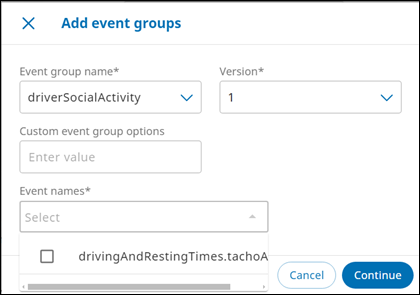
When the subscription and associated parameters set accordingly, as an Integrator, you will automatically receive Event(s), or one per one or in batch - still following settings and option chosen -, for the drivers you follow, each time they will perform a new activity in a tachograph from an associated asset.
For instance, if your driver starts driving an asset, an event will be emitted and sent to you (the allowed integrator) stating driver’s activities, such as asset details and time stamps of activities. In that way, you have up-to-date information about of your driver’s activities without needing to call an API.
Events management includes the following schema:
Event group
Each event belongs to an Event Group. There will be only one Event Group for gathering “tachograph activity” events, and giving:
- The common trunk: driverSocialActvity
- The core module: drivingAndRestingTimes
- The event itself: tachoActvity
- Full name: “driverSocialActvity.drivingAndRestingTimes.tachoActvity”
Event Envelope
Defines the properties used by Data Hub, common to all modules.
Event Data
Defines the properties containing the actual payload sent to the end consumer.
"eventType": "tachoActivity"
"eventVersion": 1
"eventData":
Each time, for this scenario, a new event will be generated with the same start time as a previous one to correct for the same driver, indicating a tacho status change for this driver and so an event to correct in the timeline. This new event will provide the same work code as before the event to correct, retrieving the initial state for the concerned driver.
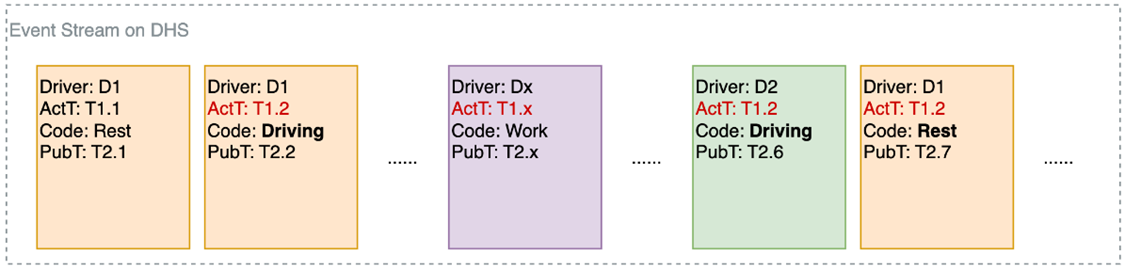
- Customers only need to check “driverId” and timestamp and apply correction to what is identical to the data compared to the available data.
- For “Push Tacho times” functionality, the data is based on the OBC tacho source and is extracted from the DRT module.
Payload JSON
{
  "eventBatchId": "bd420fec-c288-4b82-8559-271733818760",
  "eventSubscriptionId": "17082862-10f2-41f7-aade-a2c1b463e597",
  "eventBatchTime": "2025-01-30T08:32:16.9682811Z",
  "eventsData": [
    {
      "eventType": "driverSocialActivity.drivingAndRestingTimes.tachoActivity",
      "eventVersion": 1,
      "eventData": {
        "driverId": "7c5c6eb3-39e3-4f43-8f7b-1f9ddfdd4492",
        "assetId": "9f64d12c-822b-40c0-9d96-c470087d34d8",
        "driverRole": "driver",
        "origin": "obcTacho",
        "workCode": "working",
        "ferryTrain": false,
        "outOfScope": false,
        "multipleDriver": false,
        "mileage": 553720,
        "organizationId": "1a911872-0a62-427e-b7d5-6433a40c591a",
        "registeredOn": "2025-01-30T08:30:00Z",
        "eventId": "3b836694-cefa-4024-b02a-ce8eaa4b13b7",
        "createdOn": "2025-01-30T08:30:00Z"
      }
    }
  ]
}
Field level Description
| Field | Type | Optional/Required | Description |
|---|---|---|---|
| driverId | String (UUID) | Required | SCALAR ID of the driver |
| assetId | String (UUID) | Required | SCALAR ID of the asset |
| driverRole | String | Required | driver or co-driver |
| origin | String | Required | Event source: ObcTacho or Archive |
| workCode | String | Required | Tacho activity code: Unknown, Driving, Resting, Working, Availability, Deleted |
| ferryTrain | Boolean | Required | Is ferry/train |
| outOfScope | Boolean | Required | Is out of scope |
| multipleDriver | Boolean | Required | Has co-driving |
| mileage | Integer | Required | Milerage of the related asset (may be 0 if unknown) |
| organizationId | String (UUID) | Required | SCALAR ID of the organization |
| registeredOn | DateTime (ISO 8601 timestamp, UTC) | Required | Event timestamp (when the event is taken in account) |
| eventId | String (UUID) | Required | UUID of the event message |
| createdOn | DateTime (ISO 8601 timestamp, UTC) | Required | Event timestamp |
Updated 4 months ago